Design · Restructure · Generate
The complete software for database design
Draw E-R diagrams in three different styles, perform guided schema restructuring and automatically generate the logical schema. All in your browser, for free.
Ideal for university assignments and deliverables, but complete enough to document database schemas in professional contexts.
3 styles
Classic · Oval · Tabular
Restructuring
Automatic guidance
Logical schema
Automatic generation
Access
Local / Google / GitHub
Student
Classes, exercises, submissions
Teacher
Classes, assignments, exercise library
Three styles, one tool
Choose the representation that best fits your teaching or professional goal.
Studente
nome
matricola
email
Classic
The traditional ER model: entities as rectangles, relationships as diamonds, attributes as connected dots.
Studente
nome
email
matricola
Oval
Attributes shown as ovals with the name inside, ideal for a clear and immediate reading.
Studente
matricola
nome
email
Corso
codice
titolo
crow's foot
Tabular
Direct logical schema: tables with columns, primary keys and crow's foot links between entities.
Not just ER drawings: you teach design reasoning
It's not just a diagram editor: it's a teaching and operational environment.
✦
Full ER editor
Entities, attributes, keys, composites, multivalued, generalizations: everything in one tool.
⚡
Smart guidance
Automatic suggestions for restructuring: highlights issues like missing primary keys.
⟲
Guided restructuring
Step-by-step wizard: from conceptual ER diagram to restructured schema.
📊
Automatic logical schema
From the restructured diagram to the logical schema in one click: tables, primary keys, foreign keys and crow's foot notation.
📚
Teaching management
Classes, invites, assignments, submissions: complete flow from exercise to delivery.
One platform, three perspectives
Each role has its own features: find the one designed for you.
🎓
For teachers
Create classes, assign work, monitor submissions and student progress.
📐
For students
Draw ER diagrams, get guidance on design choices, join classes with a code or invite.
🏢
For businesses
Design databases in a structured way and use automatic guidance to restructure complex models.
See how it works
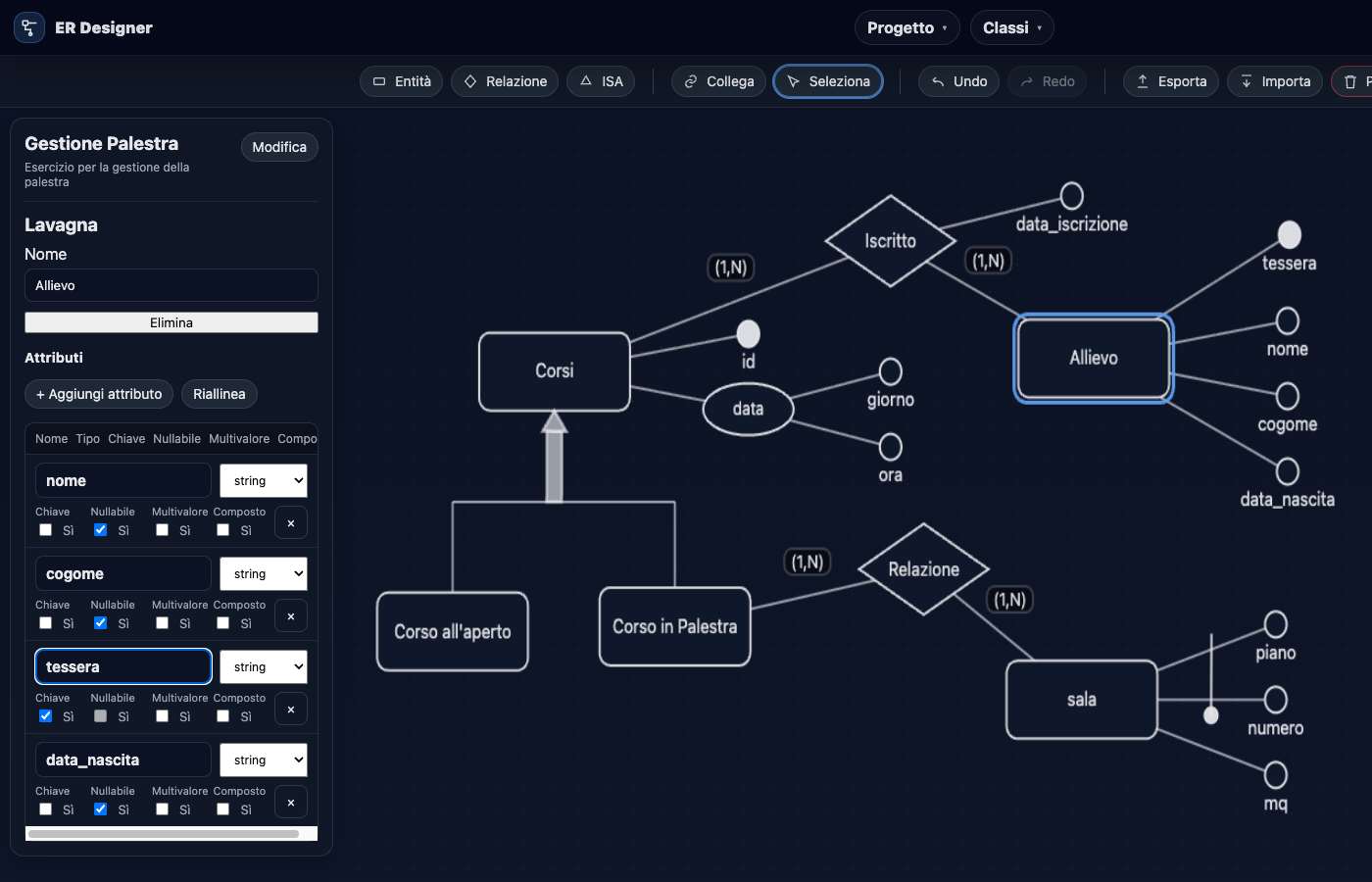
Clean, focused interface: all space dedicated to the diagram and properties.
Projects
Manage and save projects (login required)
Login
Less time managing, more time teaching
Everything you need to bring database design into the classroom.
Create classes in a few clicks
Invite students with a code or direct invite, manage enrollments and requests.
Assign custom work
Create exercises with attachments, choose recipients and monitor submissions.
Review submissions
Open student projects read-only, observe errors and reopen work if needed.
Learn by doing, with step-by-step guidance
The editor guides you from conceptual diagram to restructuring.
Create complete diagrams
Better understand multivalued, composite attributes and generalizations with an editor built for learning.
Restructuring support
The wizard guides you through restructuring: missing keys, multivalued attributes, generalizations.
Submit without complications
Join classes with a code, complete exercises and submit in an organized way.
💡
Used for teaching, studying and designing databases
Tested in database courses, labs and exercises. Designed for teachers who want a guided tool.
Simple and transparent
Students get in free. Teachers start free and scale with the department.
Student
Class access, submissions, editor
Completely free
Access teacher's classes
Full editor
Exercise submission
Teacher
Classes, assignments, submission monitoring
Completely free
Create and manage classes
Assign work with attachments
Monitor submissions and progress
Info
Institute / Department
Multi-teacher, centralized management
Multiple teachers in the same structure
Centralized user management
Dedicated onboarding
Price on request
Frequently asked questions
Quick answers to the most common questions about ER diagrams and using the whiteboard.
What is an ER diagram?
It�s a conceptual representation of a database: entities, attributes, and relationships with cardinalities.
Can I use it without an account?
Yes: you can open the anonymous whiteboard. To save projects on the server, you need to sign in.
How do I submit the diagram for an exam or assignment?
Export to PDF or PNG so you can attach it to a report or upload it to learning platforms.
Is it suitable for business projects too?
Yes: the whiteboard is also useful to document and share conceptual schemas within a team.
Does it support import/export?
You can export and import the diagram (JSON) and generate deliverables (PDF/PNG).
How does the restructuring guidance work?
A wizard analyzes the diagram, highlights issues (missing keys, multivalued, ISA) and proposes step-by-step solutions.
Start designing your database now
Free, no installation, directly in your browser.